

- Docs
- Calling
- Receiving Calls
Receiving Calls
Overview
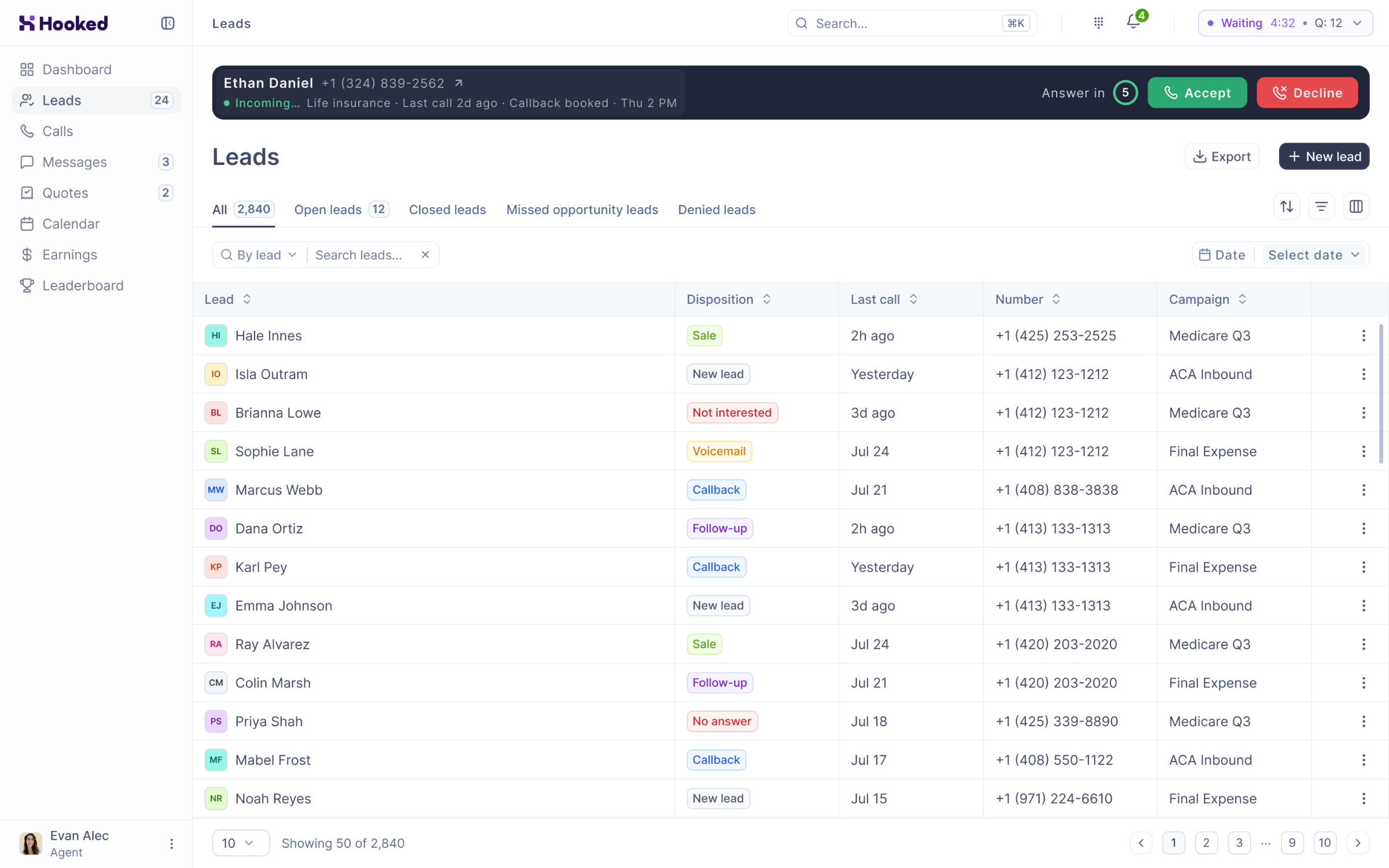
No matter what page you’re on in Hooked, you will be alerted when you receive a call via the Call Banner.
Receiving an Inbound Call
When you receive a call, the Call Banner will appear at the top of the Hooked page. If they’ve called before, it will display their name and phone number. However, if they are a new contact, only the phone number will be displayed.
Accepting a Call
You will have 10 seconds to accept a phone call by clicking on the Accept button on the Call Banner.
Rejecting a Call
If you can’t take a phone call at the moment, you can click the Decline button located on the Call Banner or wait 10 seconds. The system will accept this as a rejection.
Frequently Asked Questions
What happens if I’m too late to accept? Will I be put at the front of the call queue?
Unfortunately, if you can’t accept the call or reject it, you will be placed at the end of the queue
Can I accept calls when I’m not sitting at my computer?
No, you must be at your computer to click the Accept button.
Is it possible to navigate to other pages when I’m on a call?
Yes, while the Call Banner is locked at the top of the Hooked page, you can navigate to all the pages available to your view.