Computer Telephony Integration (CTI) is the interaction between phones and computers. This technology connects VoIP dialers and CRMs and has become an essential element in call center success. If you aren't using a CTI or a similar system within your workflow, you'll be behind the competition. But how do you know which CTI is right for you and your business?
We'll walk you through the benefits a CTI can bring to your agents and explain the various features you should prioritize when deciding on a CTI.
If you're looking for a CRM with CTI integrations already built into the system, Hooked CRM is the system you're looking for. Our call system automatically brings you to your customer information, and with our AI assistant, you won't have to worry about missing any pertinent information. Book a demo with us today to learn more about our workflows and how they'll match with your business.
What is Computer Telephony Integration (CTI)?

Computer Telephony Integrations, or CTIs, are the medium between your phone calls and CRM. These are often via outside systems that tell you exactly who is calling you and pull information from your CRM to deliver notes.
This allows your agents to become familiar with the client before they answer the phone, expediting the process and easing the customer journey experience.
How CTI Works: Key Components
The key components of a CTI are a dialer and CRM. The dialer is necessary to receive calls, and the CRM translates those calls into the information the CTI needs to display. All of these elements work in conjunction to help facilitate your clients.
Once you receive a call from your dialer, your CTI will run the number through your CRM and pull the customer's information. Once it finds the customer in your database, it will display the baseline client information and show where they are in your workflow. This gives your call representatives and agents an advantage when they begin their conversation, since they will have the necessary context to address any concerns they may have.
Core CTI Features

Not every CTI system will fit your company's needs, so it's important to evaluate its features before making a purchase. While not every feature will benefit your business, here are some that we've found essential to our insurance sales partners:
Pop-Up with Relevant Information
When a lead calls your call center, having a CTI automatically display information for your call representatives and agents to evaluate is an advantage you can't ignore. When that information is front and center, it's hard to miss.
Your CTI should display the customer's name (if they have called before) and their lead profile. If your call representatives and agents followed their call center training, they will have detailed notes for your reference.
Click-to-Call Features
Once you receive a pop-up, your CTI will give you the option to accept or decline the call. These click-to-call features can help facilitate your call queues and ensure everyone has the opportunity to make a sale.
Most dialers have click-to-call functionality. However, to answer as quickly as possible, integrating your dialer and CTI with click-to-call functions on both increases your efficiency.
Call Logging
When making calls, it's efficient to have a repository of call logs for reference. In general, your dialer and CRM should handle your call logging. However, having your CTI natively track calls can help it pull information quickly from both locations.
Automatic Call Distribution
Once the system receives a call, your CTI should filter it into the appropriate category. This prevents the frustrations that can arise when there is a first-come, first-served narrative in call distribution. Instead of having someone monitor and facilitate the calls, your CTI should automatically funnel them to the right person.
CTI Benefits for Sales and Support Teams
There are plenty of benefits to integrating your CTI into your sales and support teams. Of course, each team will get something different out of their own programs. However, here are a few common benefits we've seen across teams:
| Benefit | Description |
|---|---|
| Screen Pop-Ups | Missing a call or relevant call information is almost impossible with a pop-up screen. As long as agents remain at their computers or devices, they should see the call come in and respond accordingly. |
| Call Resolution | When call representatives and agents receive all the information at the inception of their call, they are better equipped to respond appropriately. This leads to higher-performing call resolutions. |
| Average Waiting Time Decreased | Because agents can resolve calls more quickly, the average waiting time is decreased. When more agents are closing deals, they can respond to calls and ensure a safe and pleasant customer journey. |
| Call Recording | With call recordings, managers, call representatives, and supervisors can review their records and update their process accordingly. Especially when you're working in an industry where things change rapidly, these features can save you grief in your call center training. |
How CTIs Integrate with CRMs
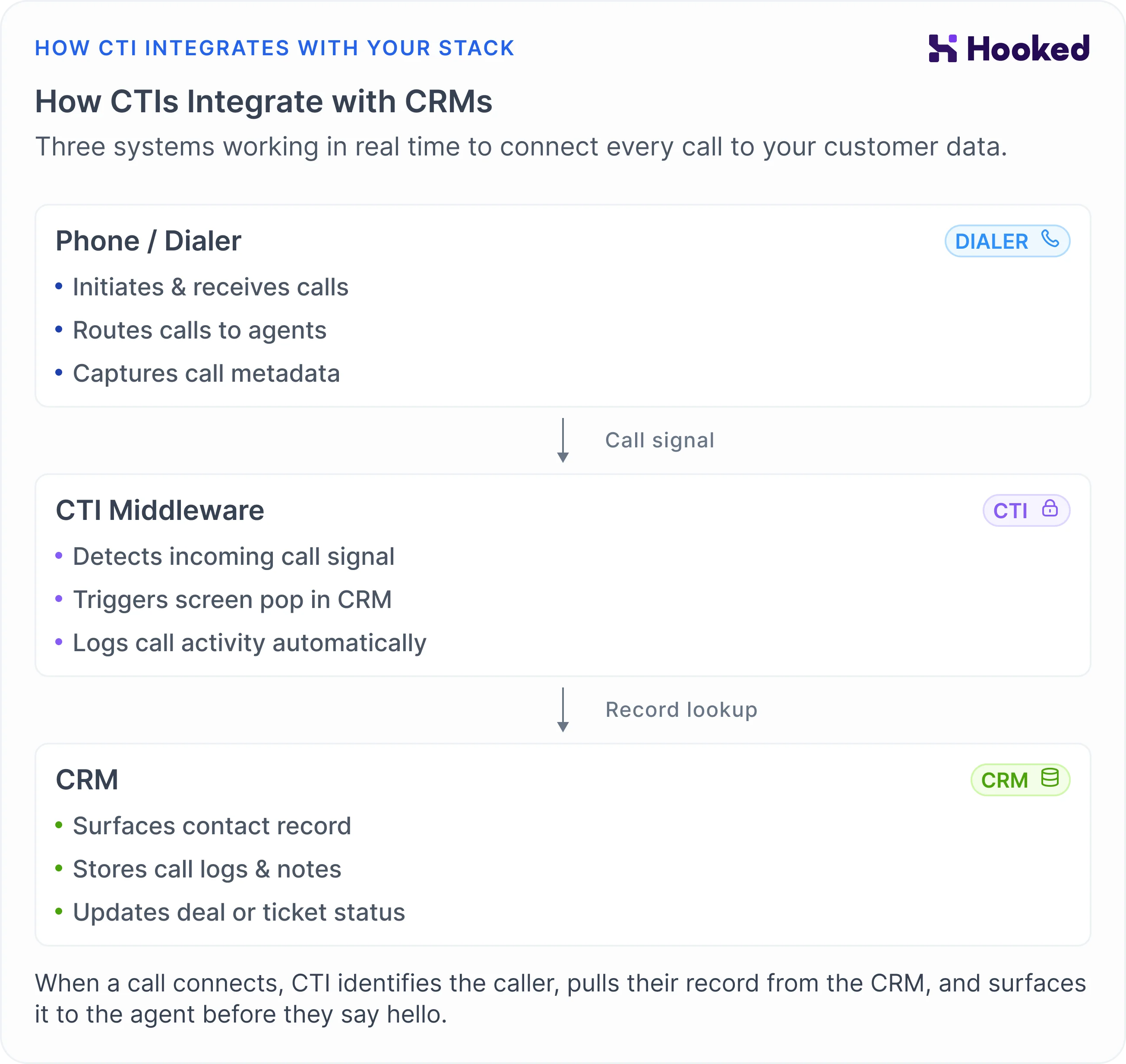
Your CTI should seamlessly interact with your CRM. Generally, once the CTI is fed the dialer information, it goes to the CRM to pull the client information. Once it receives the data, it will display the necessary information for a successful call.
If your CRM system has a native dialer and CTI, the information will be pulled from the same resource. This simplifies your customer journey and instantly increases your efficiency. We highly recommend seeking a CRM or CTI with these built-in systems for your convenience and productivity.
CTIs for Contact and Call Centers
CTIs for contact and call centers are essential for your business's success. Especially if you are handling a large number of clients, a small business, or an independent agent, having a CTI that shows you exactly who is calling and what their needs are can help you do your best.
These give you and your reps the tools, giving them the confidence to manage their calls, land sales, or transfer them to the appropriate office. These differences could mean the difference between success and failure in your business, so you should invest in these advantages.
How to Choose a CTI for Your Business
Choosing a CTI for your business begins with evaluating your business's needs. How has your business operated so far? Is there a benefit to integrating a CTI now? How are you communicating with your customers? These are important questions to ask yourself when seeking a CTI for your business.
Here are a few distinguishing factors you should consider:
- Integration Compatibility: Does the CTI integrate with your current toolset?
- Difficult Set-Up Time: How long does it take to train your agents on the new CTI?
- Omnichannel Support: What are your clients' contact preferences?
- Reporting & Analytics: What are the important analytics you are tracking for your business's ROI?
- Scalability & Pricing: How much does the CTI cost? Are they able to scale with your company?
Why Hooked Works as Your CTI

Hooked has CTI features embedded in our dialer and CRM. It's an all-in-one system that works cohesively to give you a seamless experience. When a client calls into our dialer, their baseline information gets displayed to the call representative assigned to the call. Once accepted, the system will pull up the lead information from the previous data input into the CRM, giving your agents the context needed for a successful call.
The experience was made for your sales and call center needs. With proper reporting and AI assistance, Hooked answers the problems you've been having with your current CRM integrations by providing a simple interface without all the fluff. Just giving you the information you need to cater to your customers.
Interested in learning more about our workflows? Book a demo with us today, and one of our representatives will walk you through our program and how it can enhance your business.