Are you looking to upgrade your call center productivity? Are too many "efficient" tools clogging up your call progress? We created Hooked CRM to solve the issues that you have been facing with your customer relationship management system. Instead of hopping between screens, Hooked CRM simplifies your process by including everything you need on one page.
We'll show you how to control your calls, manage your schedule, and access custom reports through the Hooked system. Plus, we'll even show you how to unlock insights from all your calls with our personalized Tacklebox AI.
Interested in implementing Hooked today? Book a demo today to see how Hooked changes the way you land a sale and increase the value of your team.
What is Hooked CRM?
Hooked CRM is the simple call management tool. It combines everything you need to make your calls a success without cluttering your workspace and muddying your process. That includes every call feature you need, scheduling that highlights your priorities, and revolutionary AI features that enhance your calls rather than complicate them.
Hooked was designed with call agents in mind, so every painpoint is addressed to pinpoint the exact ways Hooked can increase productivity.
Managing Your Calls in Hooked
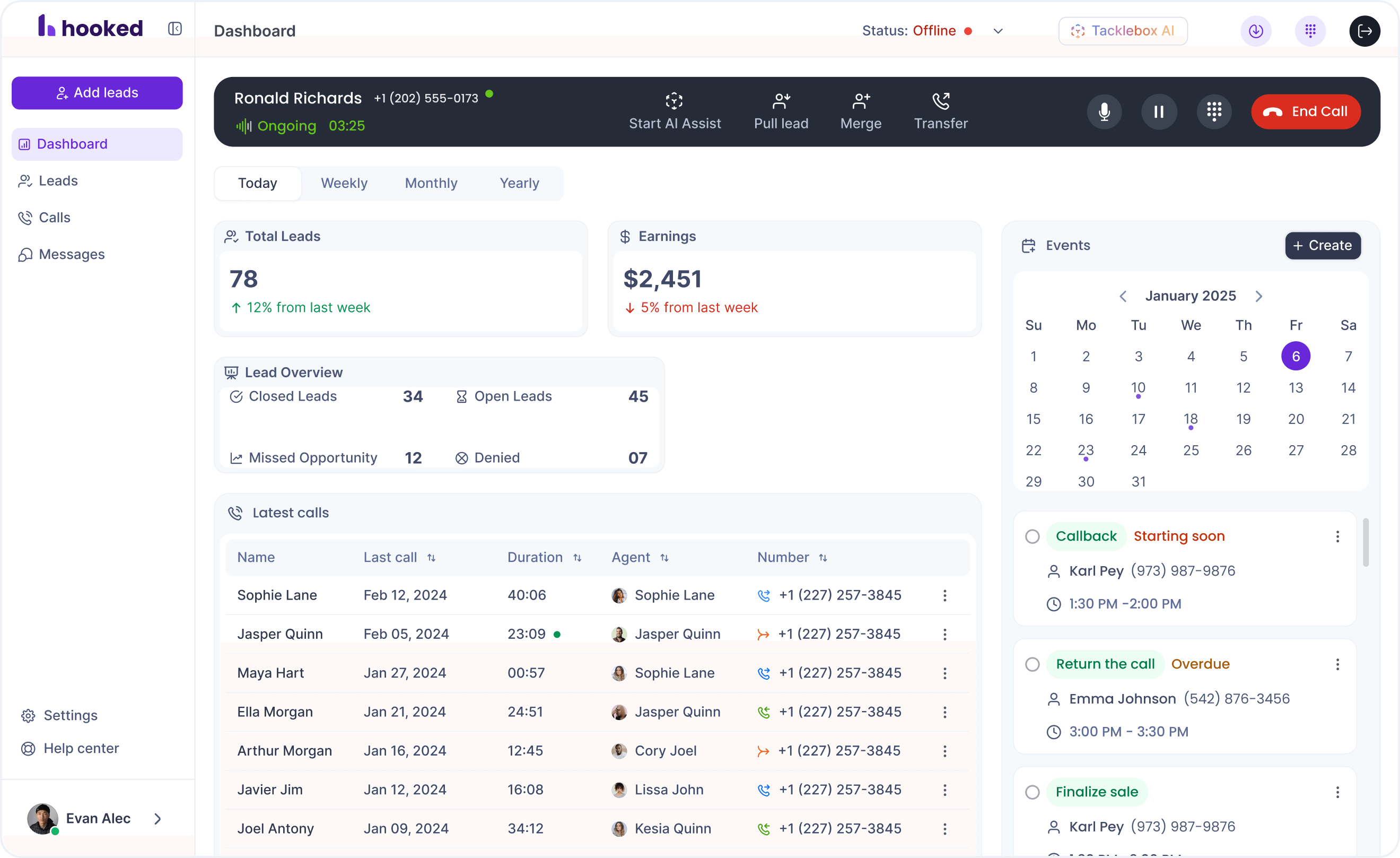
Success at Hooked starts with the first call. Once you receive a call, it'll display a non-intrusive banner you can interact with. After you start the call, the banner will adopt a new display that shows a few call features you can use throughout the call. Here's what you'll find:
- Merge Calls: Contact a manager or agent to hop onto a call with your potential client.
- Transfer Calls: Send a call to a manager or coworker to take over.
- Mute: Silence your receiver if you need to talk to someone in the office.
- Hold: For longer calls where you need to put the caller on hold. The caller will hear hold music until you return.
- End Call: This red button will end your call and send you to the lead summary page.
- Start Copilot: Once clicked, this button will open the AI features within Hooked. This includes live transcription, AI assist features, and automatic form fills.
Call controls are located on the banner, so you can manage other tasks on the side, like scheduling another call or writing notes, without taking away from the conversation.
Hooked CRM's Scheduling
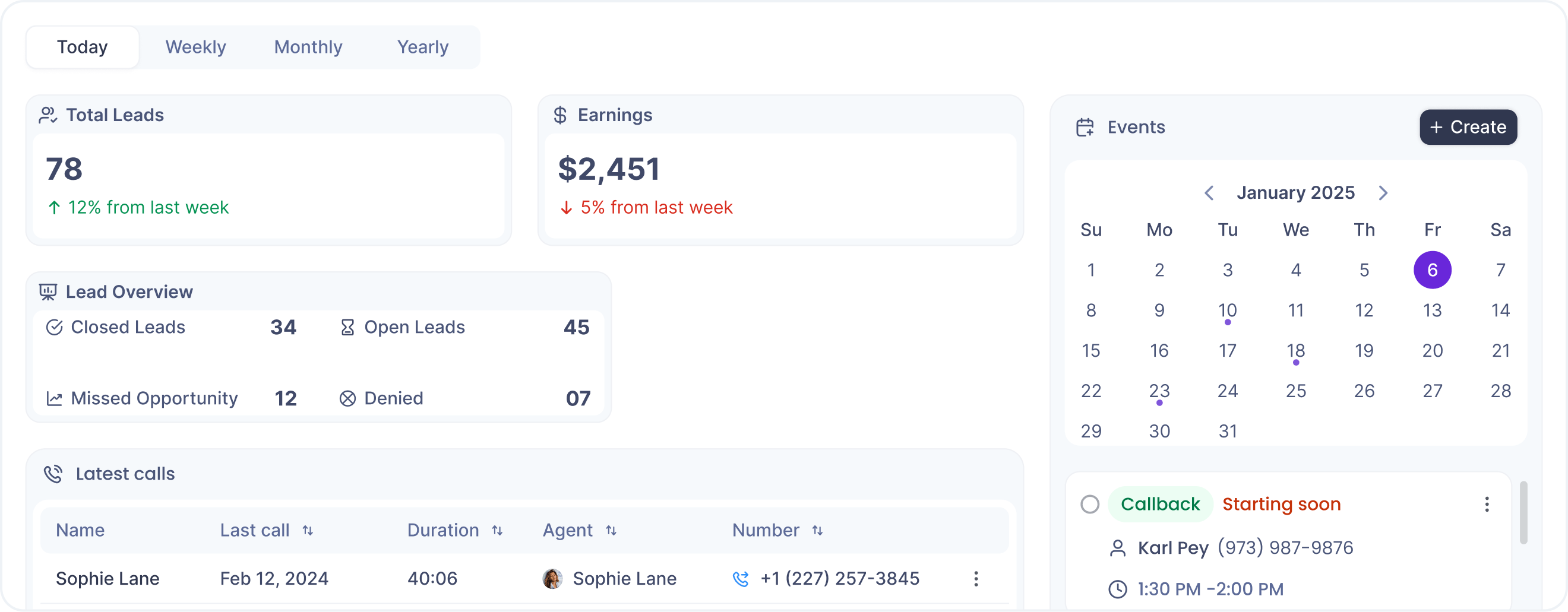
Your schedule will be on the right side of the Hooked Dashboard, providing a detailed calendar and list of events you should know. Of course, to have events on your calendar, you'll need to set them up.
You can set up events at anytime by clicking the "+Create" button above the calendar. You can attach a contact to the event and access the lead notes and contact information. The system will also notify you when an appointment is coming up and prompt you with your previous notes.
Setting Up Schedules with Tacklebox AI
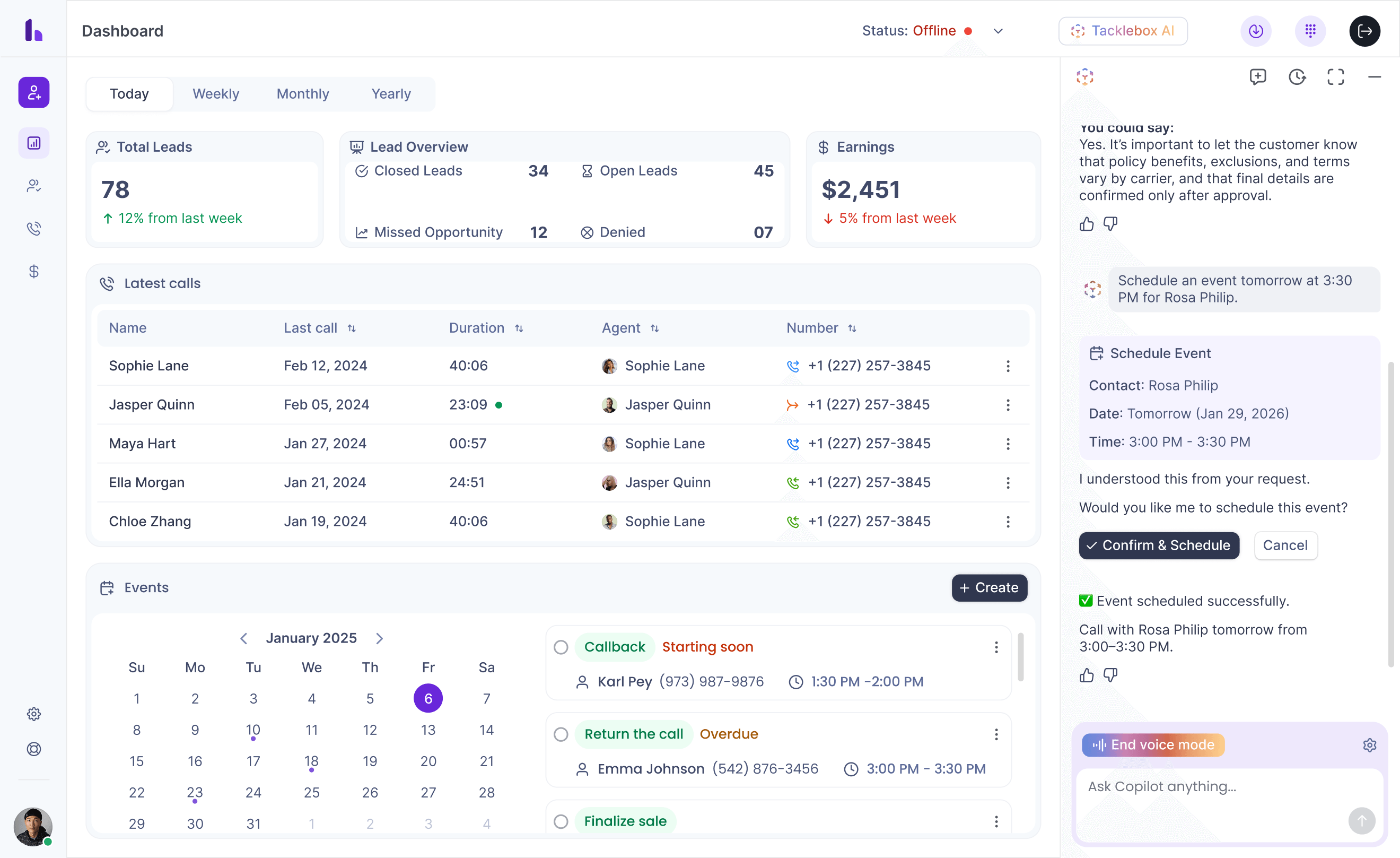
With Hooked CRM, you'll have access to Tacklebox AI: a series of AI tools that actually assist agents without hindering them. One of the main features is the ability to automate the scheduling feature on Hooked. When you are having the conversation, have the AI assist open and an event tab open. The Live Assist AI will discover the fields and add the appointment to your schedule.
Hooked Lead Page Features
The Hooked Lead Page shows you a list of all the leads you are working with. These leads can be filtered by date, name, status, and more. From this page, you can also interact with the lead by calling, messaging, or adjusting their status within the system.
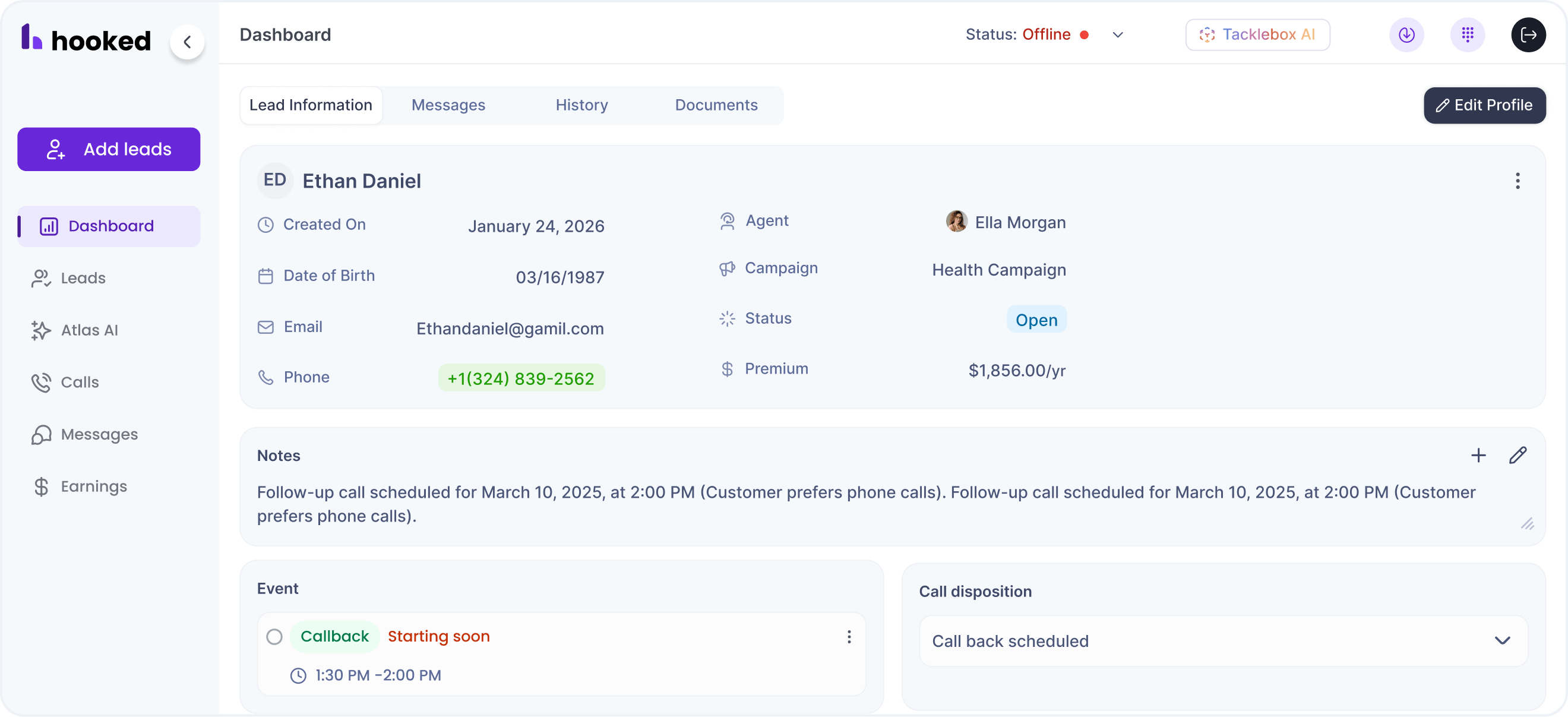
Clicking a lead will show the "Lead Profile" page, where you can see the notes you and Tacklebox AI took, the next steps for that client, and the client's history. Each lead's information is available to you at all times, and you won't have to stop your call to make changes, making it a seamless experience.
Automatic Lead Updates Through Tacklebox AI
While you are on a call with Tacklebox AI toggled on, you'll notice the lead profile information updates to what is being said. The AI will capture specific notes or clarifications to re-edit itself to the most up-to-date information, freeing your agents to focus on the sale instead of filling out forms.
Hooked's Reporting
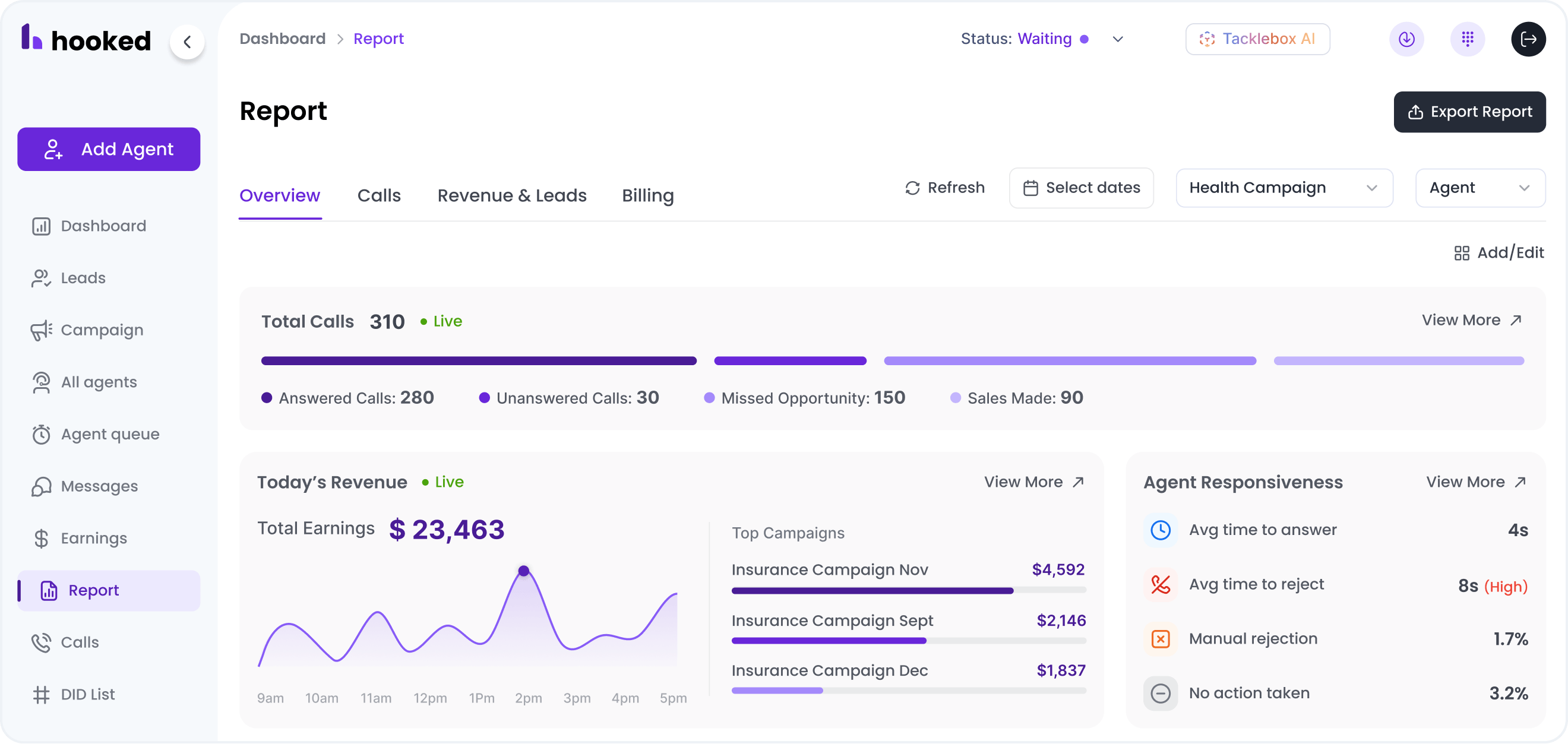
Hooked CRM has reporting features customized for your team. It keeps track of all the calls you've made, the amount of money you've made, has a personalized activity log, and more. These tools are simple and easy to use with live updates that ensure you're receiving the most relevant information.
When you're satisfied with the reports, you can export them by clicking on the "Export Report" button at the top right of the screen on the Report page. These reports will save natively to your computer and can be accessed at any point.
Automatically Create Charts & More with Tacklebox AI
Are you not finding the report you need? Tacklebox AI has a special reporting feature that can generate reports and graphs and pull statistics as needed.
Simply head to the "AI Report" tab on the reporting tab to pull up the AI chat. It will only pull data from the admin documents and your call logs to provide clear and accurate graphs and statistics. Instead of wasting time creating those graphs by yourself, you can expedite the process and provide deeper insights into all your calls.
Tacklebox AI: Live AI Assist, Knowledge AI, and AI Reporting
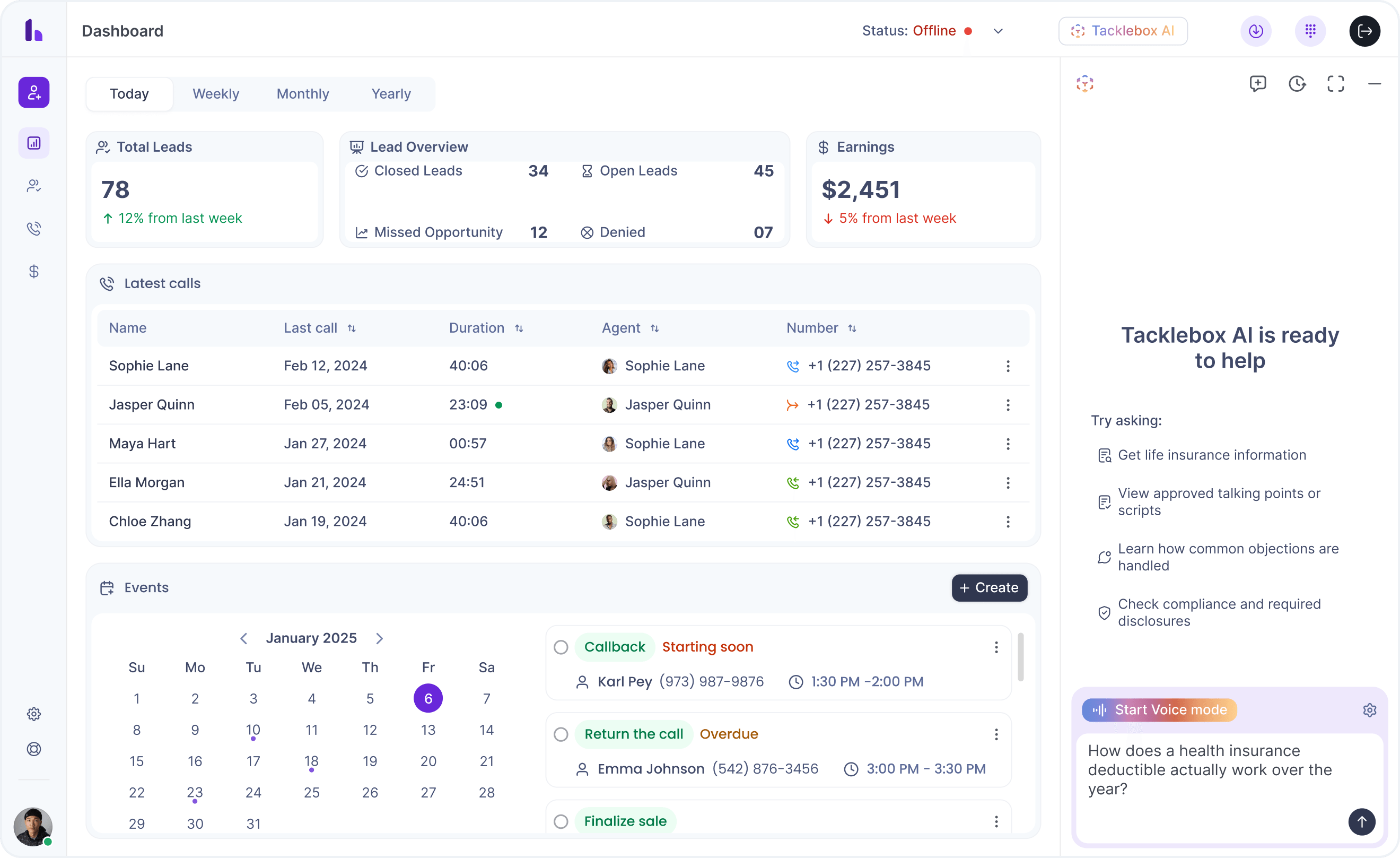
Hooked CRM has its own AI agent working alongside you to increase your efficiency. We call this our "Tacklebox AI", since it houses all the AI tools you need. Currently, we have three AI assistants that work cooperatively with the agent to increase productivity and answer questions instantly.
Live AI Assist
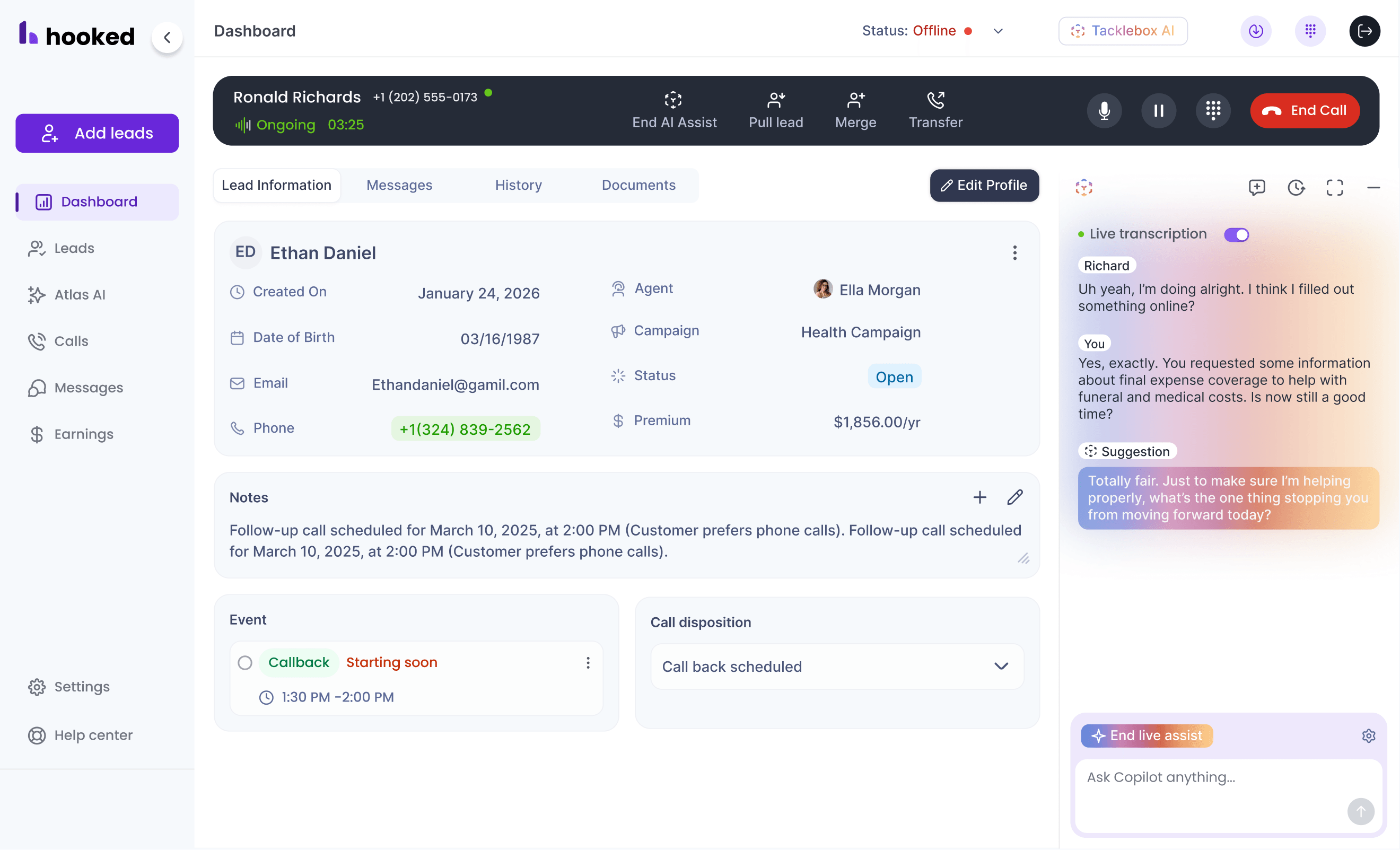
At any moment, you can access the Live AI Assist to answer any question you have. If you're on a call or reviewing reports, you can click on the "Live AI Assist" button off to the side, and an AI chat assistant will be ready to answer your question.
Hooked's Live AI Assist will only pull information provided by your Hooked Admins and previous calls, so you won't have to worry about false data.
Knowledge AI
Knowledge AI is similar to the Live AI Assist feature, but it provides deeper answers with in-depth information and saves your chats for future reference. You can ask questions about your documentation, what needs to be improved in your current process, and ask for quick stats.
Hooked admins can access and update the documentation as needed, so you know you'll be getting the most relevant and up-to-date information. This feature is housed on the navigation bar and integrates with your current process, improving your ability to sell.
AI Reporting
The AI Reporting feature is on Hooked's "Report" page. It can create custom reports according to your specific needs, backed by your call data and documentation. The AI also provides updates on your statistics: how you've been doing, significant changes within a process, and the highs and lows of your performance.
These reports are designed to increase your productivity and work alongside your current workflow without interfering with your process.
Conclusion
Hooked CRM is built on a desire to eliminate the clutter that comes with modern dialers and CRMs without throwing out the essentials. Every tool you need for your workflow is provided in one convenient location, without switching between screens or stopping your calls.
If you're interested in a CRM that actually increases your productivity and gives you insights into all your calls, consider booking a demo with Hooked. One of our agents will show you how to integrate Hooked into your current process and how it can benefit your business.